Applying conditional styling🔗
You can style your rendered diagram-SVGs individually with functions
such that explicit highlighting of objects can be achieved. With this
you can control styling of ElkChildTypes
during the serialization while rendering.
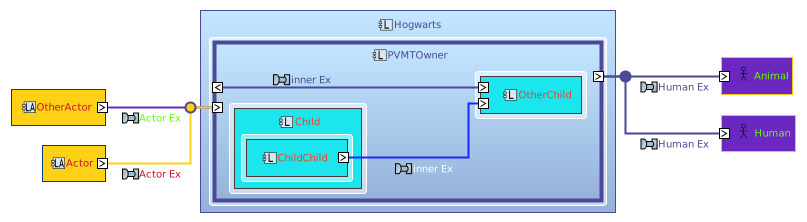
Since SVGs can be styled via CSS your options are gigantic. An example
is given by the styling of Actor Functions (i.e. Functions which their
parent Subsystem has the attribute is_actor=True) like it is done in
Capella. These appear to be blue.
import capellambse

model = capellambse.MelodyModel("tests/data/ContextDiagram.aird")
diag = model.by_uuid("957c5799-1d4a-4ac0-b5de-33a65bf1519c").context_diagram
diag.render("svgdiagram").save(pretty=True)
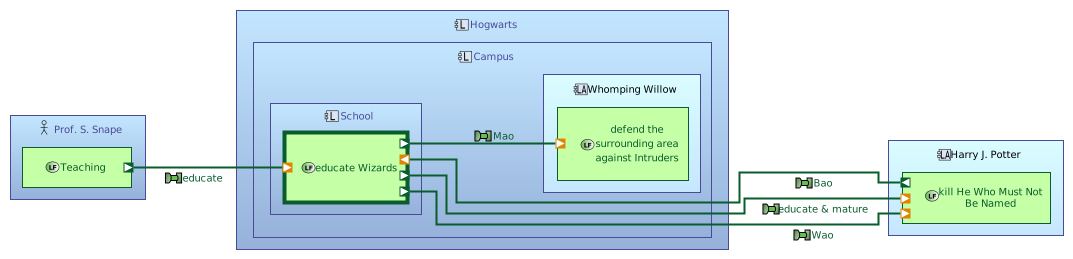
This is currently the default style which overrides the default from py-capellambse.
No symbol rendering🔗
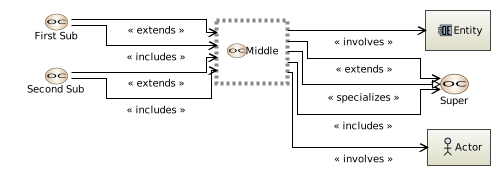
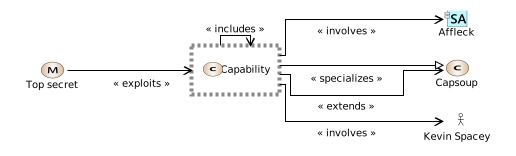
There are some ModelObjects that are displayed as symbols in a diagram (e.g.
Capabilities or Missions). The .display_symbols_as_boxes parameter gives you
the control to render these as boxes such that the symbol is displayed as an
icon beside the box-label. Per default it is set to True.
Box-only style for Context diagram of Middle OperationalCapability [OCB]
from capellambse import aird

diag = model.by_uuid("da08ddb6-92ba-4c3b-956a-017424dbfe85").context_diagram
diag.render("svgdiagram", display_symbols_as_boxes=False).save(pretty=True)
Box-only style for Context diagram of Capability Capability [MCB]
from capellambse import aird

diag = model.by_uuid("9390b7d5-598a-42db-bef8-23677e45ba06").context_diagram
diag.render("svgdiagram", display_symbols_as_boxes=False).save(pretty=True)
No edge labels🔗
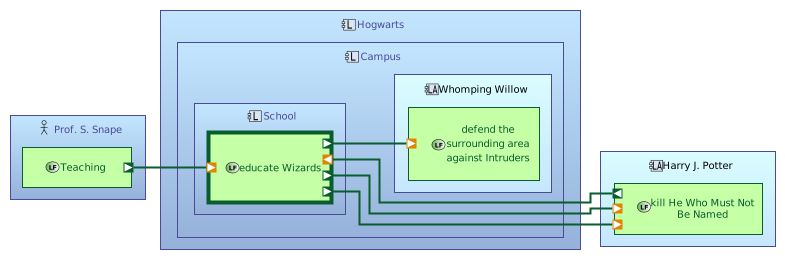
The no_edgelabels render parameter prevents edge labels from being displayed.
No-edgelabels style for Context diagram of Capability Capability [MCB]
import capellambse

model = capellambse.MelodyModel("tests/data/ContextDiagram.aird")
diag = model.by_uuid("957c5799-1d4a-4ac0-b5de-33a65bf1519c").context_diagram
diag.render("svgdiagram", no_edgelabels=True).save(pretty=True)
Examples for custom styling🔗
You can switch to py-capellambse default styling by overriding the
render_styles Attribute with an empty dictionary:
No styling
from capellambse import aird
from capellambse_context_diagrams import styling

diag = model.by_uuid("957c5799-1d4a-4ac0-b5de-33a65bf1519c").context_diagram
diag.render_styles = {}
diag.render("svgdiagram").save(pretty=True)
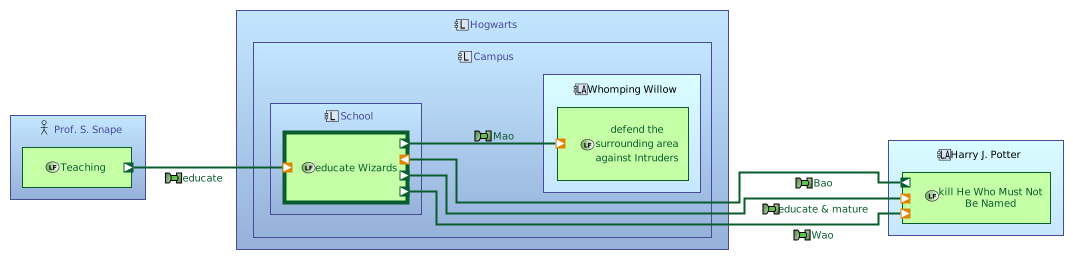
You probably noticed that the SystemAnalysis diagrams on the index page have custom styling. There we applied the SYSTEM_EX_RELABEL filter and SYSTEM_CAP_STYLING style. These styles are applied per default.
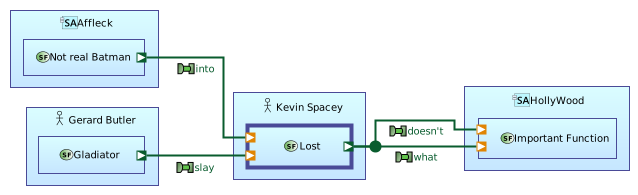
Style your diagram elements (ElkChildType) arbitrarily:
Red junction point
from capellambse import aird
from capellambse_context_diagrams import styling

diag = model.by_uuid("a5642060-c9cc-4d49-af09-defaa3024bae").context_diagram
diag.render_styles = dict(
    styling.BLUE_ACTOR_FNCS,
    junction=lambda obj, serializer: {"stroke": aird.RGB(220, 20, 60)},
)
diag.render("svgdiagram").save(pretty=True)
Display Port Labels🔗
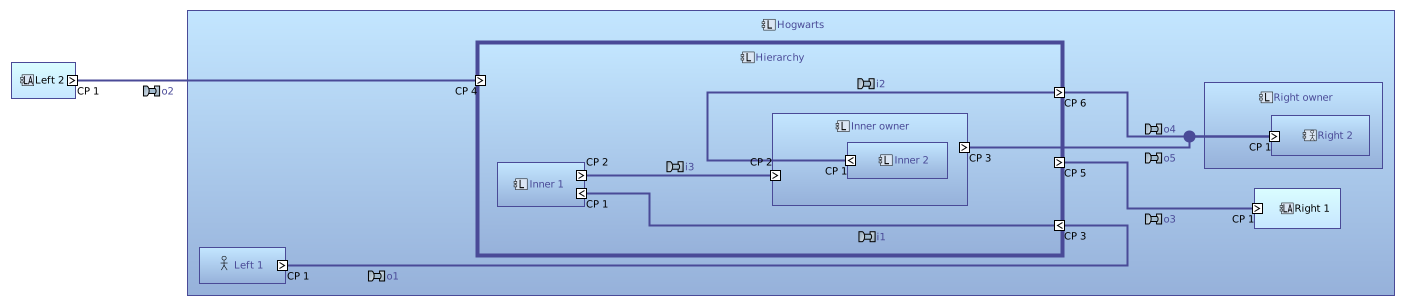
The display_port_labels render parameter allows you to display the port labels and port_label_position allows you to set the position of the port labels.
Hierarchical diagram
import capellambse

model = capellambse.MelodyModel("tests/data/ContextDiagram.aird")
obj = model.by_uuid("16b4fcc5-548d-4721-b62a-d3d5b1c1d2eb")
diagram = obj.context_diagram.render("svgdiagram", display_port_labels=True)
diagram.save(pretty=True)
PVMT Styling🔗
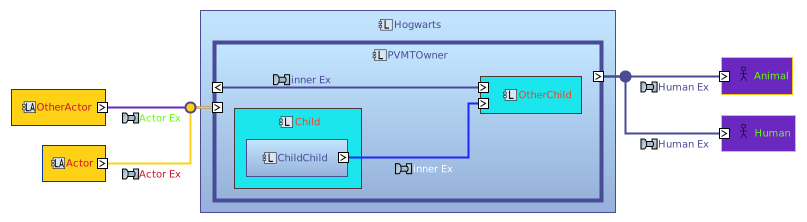
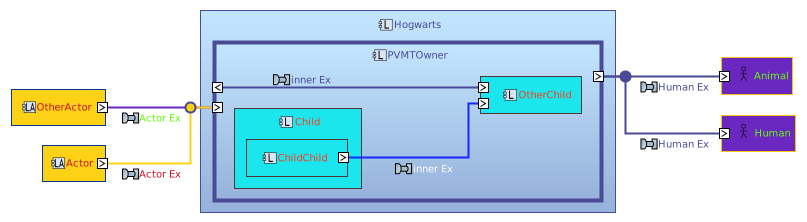
The pvmt_styling render parameter allows you to dynamically style diagram elements based on PVMT (Property Value Management Tool) properties attached to model elements in Capella. This enables custom coloring and styling based on model metadata.
PVMT Integration
This feature requires PVMT properties to be defined in your Capella model. The styling system reads color values from specific PVMT properties and applies them to diagram elements.
Configuration🔗
The pvmt_styling parameter accepts a dictionary with the following structure:
pvmt_styling = {
    "value_groups": ["Test.Kind.Color"],  # List of PVMT value group names
    "children_coloring": False,  # Whether to apply styling to child elements
}
children_coloring is set per default to False. Without using this flag the
following shorter values for pvmt_styling are supported:
diagram.render(..., pvmt_styling={"value_groups": ["Test.Kind.Color"]})
diagram.render(..., pvmt_styling=["Test.Kind.Color"])
diagram.render(..., pvmt_styling="Test.Kind.Color")
Supported PVMT Properties🔗
The following PVMT properties are automatically mapped to CSS styling:
| PVMT Property | CSS Property | Description |
|---|---|---|
__COLOR__ |
fill |
Background/fill color of elements |
__BORDER_COLOR__ |
stroke |
Border color of elements |
__LABEL_COLOR__ |
text_fill |
Text color of labels |
Example Usage🔗
PVMT Styling Example
import capellambse

model = capellambse.MelodyModel("tests/data/ContextDiagram.aird")
obj = model.by_uuid("789f8316-17cf-4c32-a66f-354fe111c40e")

diagram = obj.context_diagram.render(
    "svgdiagram",
    pvmt_styling={
        "value_groups": ["Test.Kind.Color"],
        "children_coloring": False
    }
)
diagram.save(pretty=True)
PVMT Styling with Children Coloring
import capellambse

model = capellambse.MelodyModel("tests/data/ContextDiagram.aird")
obj = model.by_uuid("789f8316-17cf-4c32-a66f-354fe111c40e")

# Apply PVMT styling with children coloring
diagram = obj.context_diagram.render(
    "svgdiagram",
    pvmt_styling={
        "value_groups": ["Test.Kind.Color"],
        "children_coloring": True
    }
)
diagram.save(pretty=True)
Child Shadow🔗
Render white shadow boxes underneath children boxes to increase contrast against the parent boxes.
Child Shadow Example
import capellambse

model = capellambse.MelodyModel("tests/data/ContextDiagram.aird")
obj = model.by_uuid("789f8316-17cf-4c32-a66f-354fe111c40e")

diagram = obj.context_diagram.render(
    "svgdiagram",
    pvmt_styling={
        "value_groups": ["Test.Kind.Color"],
        "children_coloring": False
    },
    child_shadow=True,
)
diagram.save(pretty=True)